Senior Product Designer · UX Lead · Design strategist

Enterprise software rarely fails because of the interface. It fails when people stop trusting the system.

I'm a research-led product designer. I find the real problem hiding under the request — then design the product that fixes it, not just the interface.

14+
Years designing enterprise systems
$20M+
Revenue platform owned in design
100+
Research interviews & workshops
7+
Products shipped across the globe
Hero artworkDrop the rendered illustration at/hero-research-stack.png
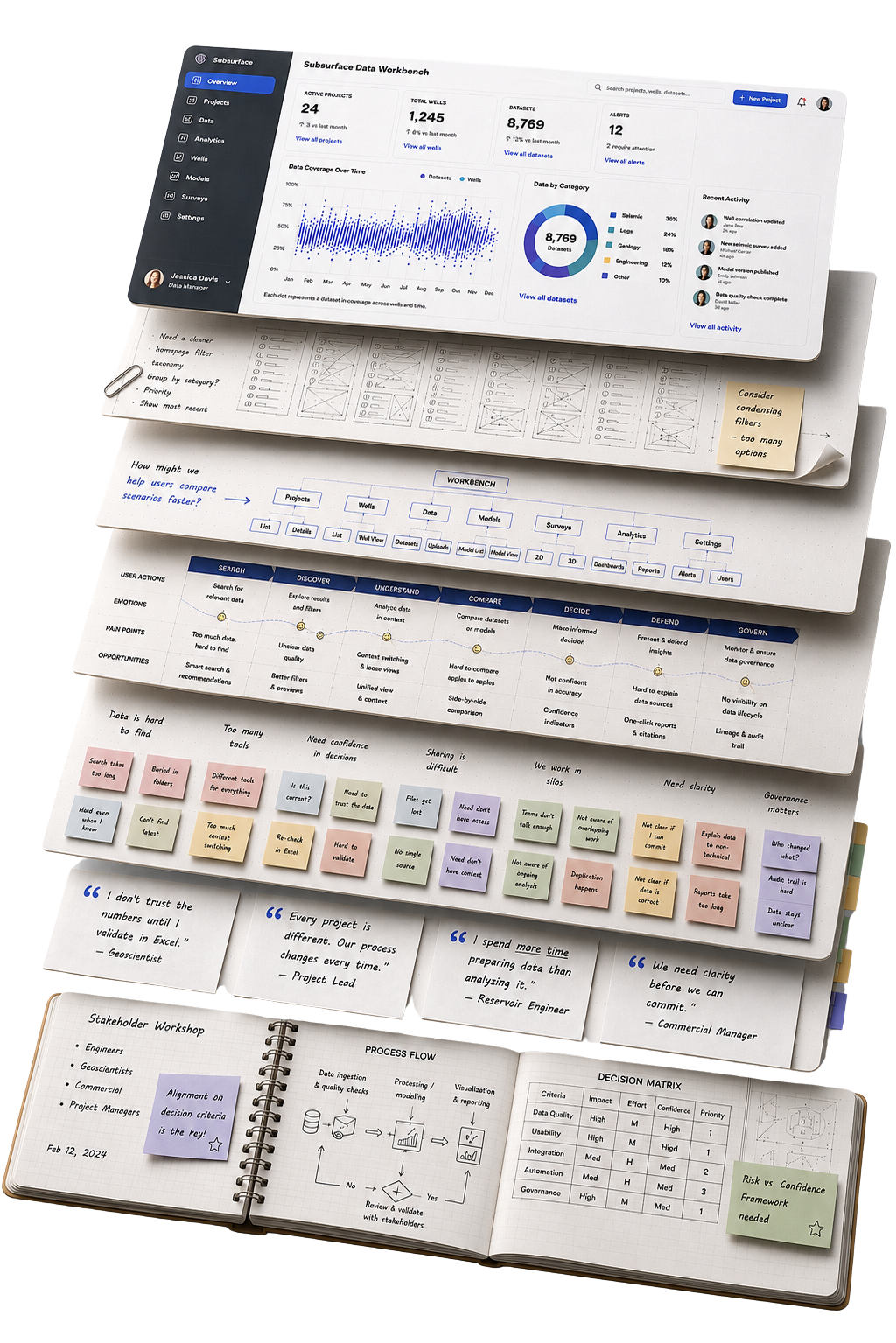
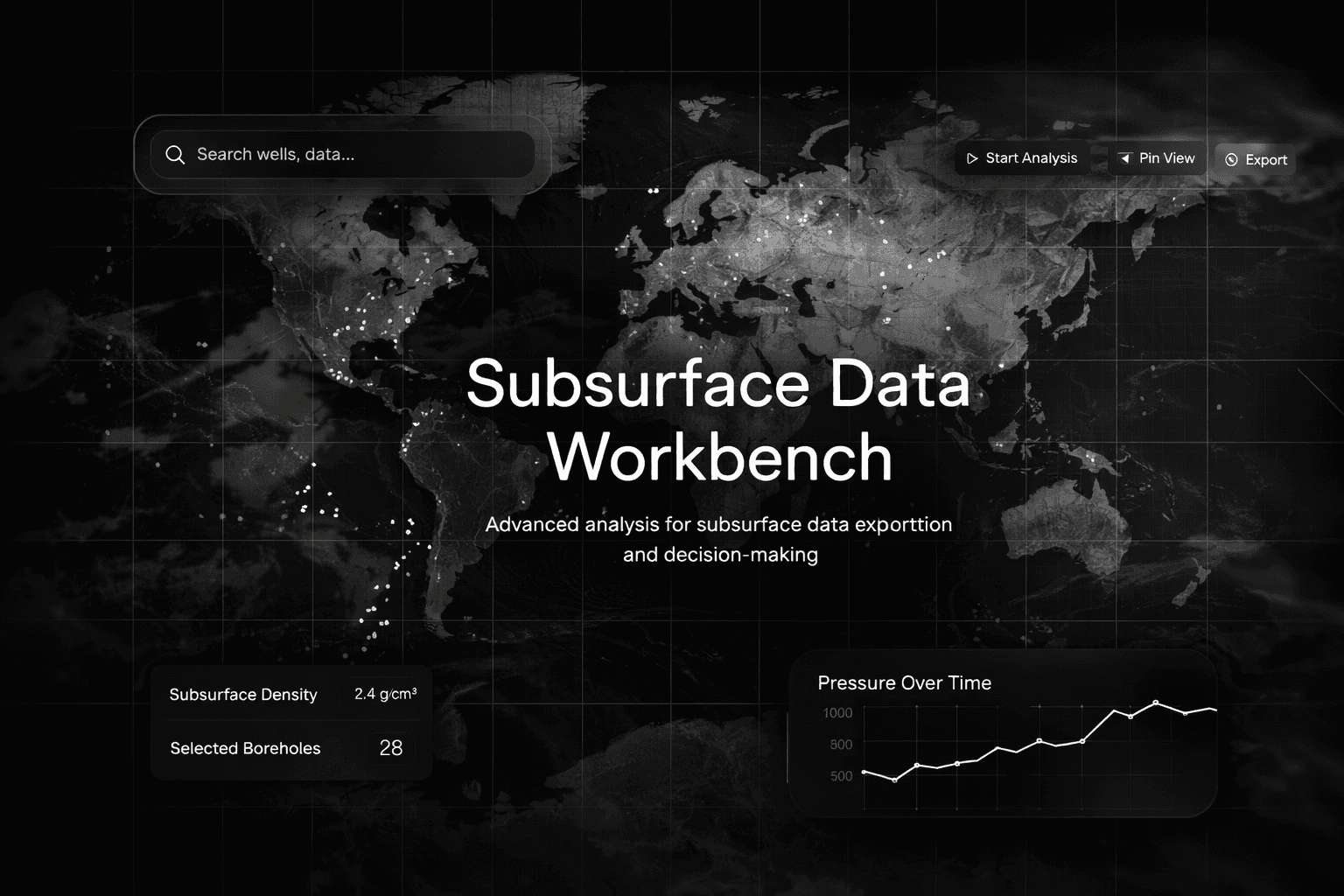
Enterprise UX research artifacts cascading beneath a Subsurface Data Workbench dashboard — printed wireframes, information architecture, journey maps, an affinity-mapping wall, research quotes and a workshop notebook.
Before the interface comes the harder question — what problem are we actually solving?
Work

Four transformations.

Every engagement began with one request. Research uncovered another problem entirely.

Enterprise data platform · Flagship

Subsurface Data Workbench

Stakeholders asked forBetter search & discovery
Confidence before decisions
Read the case study →
Planning platform · Research-led

Facility Planner

Stakeholders asked forEstimation software
Decision support
Read the case study →
Operations platform · Research-led

Vendor & Contractor Management

Stakeholders asked forDashboards
A shared operating model
Read the case study →
Design leadership · Mentoring

Building UX capability

The organisation asked forBetter designers
A stronger design organisation
Read the case study →
My operating model

The same pattern. Every time.

Every enterprise product looked different. The thinking behind them never changed.

Listen

What every team believes the problem is.

Find the hidden disagreement

Where teams secretly define the problem differently.

Reframe the problem

Turn the request into the real challenge.

Design the operating model

Decisions, ownership and workflows — not just screens.

Earn trust

Products people trust more than their workarounds.

“Every successful project I've led changed direction at the hidden disagreement.”

Design starts long before Figma

It's not a design process. It's a thinking process.

Typical UX process
1Research
2Define
3Ideate
4Design
5Test
6Deliver
Focuses on screens and features.
How I work
1Listen
2Find the hidden disagreement
3Reframe the problem
4Design the operating model
5Design the interface
6Earn trust
Focuses on the right problem and the right system.
About · Reflection

What fourteen years changed.

Early on, I believed better interfaces made better products. Years alongside geoscientists, engineers and operations teams taught me otherwise: people don't struggle with software — they struggle with uncertainty, and confidence, not features, decides whether a product succeeds.

Over the last several years the work has widened beyond my own screens — mentoring designers, facilitating cross-functional workshops, and building the research and design practice that other teams now decide with.

Research leader Product strategist Systems thinker Team builder People mentor
Certified
LUMA · Design Thinking Facilitator NN/g · Measuring UX & ROI NN/g · Research Ops HFI · Certified Usability Analyst HFI · UX Analyst IIT Delhi · Design Thinking & Innovation
Ecosystems & platforms I've worked across
Experience

How my thinking evolved

Not a list of roles — the shifts that changed how I approach every enterprise problem.

2023 — Present
Leadership
SLB (Schlumberger) · Houston & Pune

Data Platforms — UX Lead and Senior Product Designer

Lumi Data Workspace · Unified Data Services · Operational Data Foundation
Learned that the hardest problems are organisational, not visual.

Design leadership became about how teams decide, who owns the data, and whether they trust it — not just what ships.

2016 — 2022
Depth
SLB (Schlumberger) · Pune

UX Lead / Senior UX Researcher

IT Data Platform · CIM Catalog · Cognitive Procurement (Athena) · BI ecosystems
Learned that research earns the right to redefine the problem.

Turned tangled data and governance constraints into systems people adopted — because adoption follows trust, not features.

2012 — 2016
Foundation
KPIT · Mindtree · Altran

UX & Interaction Designer

EA Sports · Genpact · Unilever · Vodafone · telecom & data platforms
Learned the fundamentals: behaviour, business process, and influence.

EA Sports → interaction shapes behaviour; Unilever → systems fail when process is ignored; Genpact → research moves business decisions, not just validates UI.

Influence

How I scale design

Building the systems, standards and communities that outlive any single project.

ResearchOps

  • Research playbooks
  • Templates & repositories
  • Study-design standards
  • Insights library

Leadership

  • Hiring & interviewing
  • Career growth & mentorship
  • Design reviews & strategy
  • Team development

Community

  • UX SIG leader at SLB
  • Webinars & knowledge sharing
  • Workshops & panels
  • Cross-team collaboration

Accessibility

  • Accessibility champion
  • Accessible design guidelines
  • Audits & inclusive practices
  • Awareness programs

Recognition

SLB Bronze Award — Performance LiveAward
SLB Bronze Award — Rise of the PhoenixAward
Speaker — Reservoir Symposium AsiaDesign Thinking for complex engineering problem-solving.Speaking
Global innovation presentation — SLB, BeijingPresented an innovation initiative to international stakeholders.Keynote
Speaker — International Society of Women EngineersOn design, research & women in enterprise tech.Speaking
Gold Medalist — BCA, Bharati Vidyapeeth UniversityHonor
A closing thought

Most organisations don't have a design problem. They have a clarity problem.

Interfaces only reflect the quality of the decisions made before design begins. If your team is trying to untangle complexity before building the next thing, I'd love to have that conversation.

Senior / Lead / Principal Product Design Enterprise UX & product strategy Research-led product design Houston · Pune · remote or relocation
All work
Enterprise data platform · Case study

Subsurface Data Workbench

A cloud platform that helps geoscientists discover, validate, and share trusted subsurface data for high-stakes exploration decisions.

Redesigned an enterprise data platform after research revealed low adoption caused by poor trust, fragmented discovery, and governance friction.

Role
UX Lead
Year
2023 — Present
Domain
Subsurface
Team
Houston ↔ Pune
Data Workbench — product overview
At a glance
The problem

Domain users struggled to discover, evaluate, and confidently use subsurface data because quality, governance, and readiness were hidden throughout the workflow.

My role

Led end-to-end UX from research through interaction design — defining the product vision, information architecture, workflows, and future-state experience.

The outcome

Repositioned the Data Workbench from a passive data catalog into a trusted decision-support platform for governed data discovery.

The challenge

Existing workflows forced experts to search through fragmented datasets with little visibility into quality, readiness, or lineage. Engineers often relied on personal knowledge to determine which datasets could be trusted, leading to duplicated effort, inconsistent decisions, and low confidence in the platform.

Research findings

Research revealed two equally important user groups:

Data Manager
Owner of the data inventory

Owns the data inventory and makes sure users can actually find and access the right data — importing, organizing, packaging, and governing access across the catalog.

Responsibilities
  • Importing and organizing datasets.
  • Creating and sharing data packages.
  • Permissions and access control.
  • Catalog management and data availability.
Typical tasks
  • Upload new seismic surveys and register wells.
  • Create data packages and share datasets.
  • Assign permissions and manage access.
  • Archive datasets.
Subsurface Expert
Geoscientist / engineer · data consumer

Makes high-stakes interpretation and modeling decisions, and needs to move fast without staking months of work on the wrong data.

Goals
  • Find the right data from domain intent, not file names.
  • Know at a glance what is ready and fit-for-purpose.
  • Commit to data and decisions with confidence.
Frustrations
  • Discovery starts from filenames and storage paths.
  • Readiness and QC signals arrive too late.
  • Wrong data can invalidate months of work.
The hard part: these roles are tightly coupled. The experience had to let data managers organize and govern access without slowing experts down, and let experts find and use data fast without breaking governance.
Research insights

Through interviews, workshops, and journey mapping, five themes consistently emerged:

  • Experts searched by domain knowledge, not file structures.
  • Data quality was only discovered after investing significant effort.
  • Maps exposed unqualified datasets without context.
  • Sharing created uncontrolled copies that broke governance.
  • Trust depended on experienced colleagues rather than the platform itself.
The user journey

Journey mapping revealed four critical moments where user confidence was either built or lost. Rather than redesigning individual screens, the experience strategy focused on improving these decision moments.

01
Find trusted data
Goal
Start from domain concepts and geography, not storage structure.
Risk
Searching by filename leads to the wrong starting point.
02
Validate confidence
Goal
See readiness and QC signals before investing time.
Risk
Late signals mean effort spent on unusable data.
03
Use with assurance
Goal
Commit data to interpretation with a clear fitness verdict.
Risk
Unqualified data can invalidate months of work.
04
Share without losing governance
Goal
Collaborate on one qualified, referenced version.
Risk
File exports break lineage and compliance.
Design vision

Design the Data Workbench as a trusted upstream data supply platform — where readiness, lineage, and governance are embedded quietly into everyday expert workflows.

Before / after
Before
  • File- and format-based discovery.
  • Late visibility into QC and readiness.
  • Unqualified data exposed in maps and search.
  • Manual file sharing creating shadow copies.
  • Reactive governance model.
AfterOptimized
  • Concept-driven discovery.
  • Early and consistent readiness signals.
  • Only qualified data visible during discovery.
  • Governed, reference-based sharing.
  • Built-in, quiet governance framework.
Experience strategy

Four design principles, each addressing one decision moment — shown with the screen that delivers it.

① Find trusted data

Start from domain intent

Problem
Discovery forced experts through file names and storage paths — far from how they think.
Decision
Let experts begin from domain concepts and geography.
Design
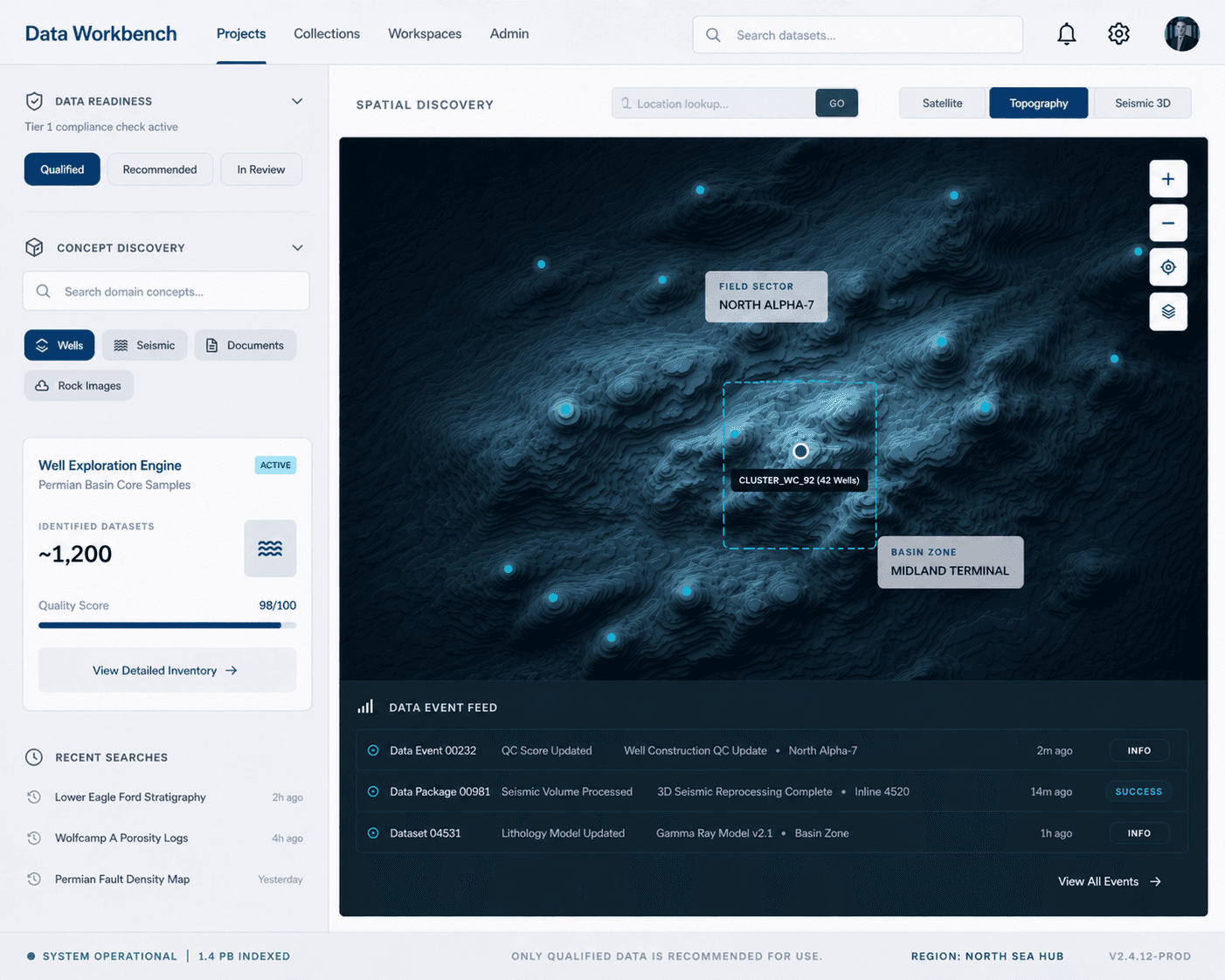
Dual discovery — concept-based and spatial — over a map of fields and wells.
Impact
The right starting point, with far less noise early in the workflow.
Data Workbench — spatial and concept discovery screen
② Validate confidence

Surface trust early

Problem
Readiness and QC signals arrived late, after time was already invested.
Decision
Move readiness and QC upstream into first-class filters.
Design
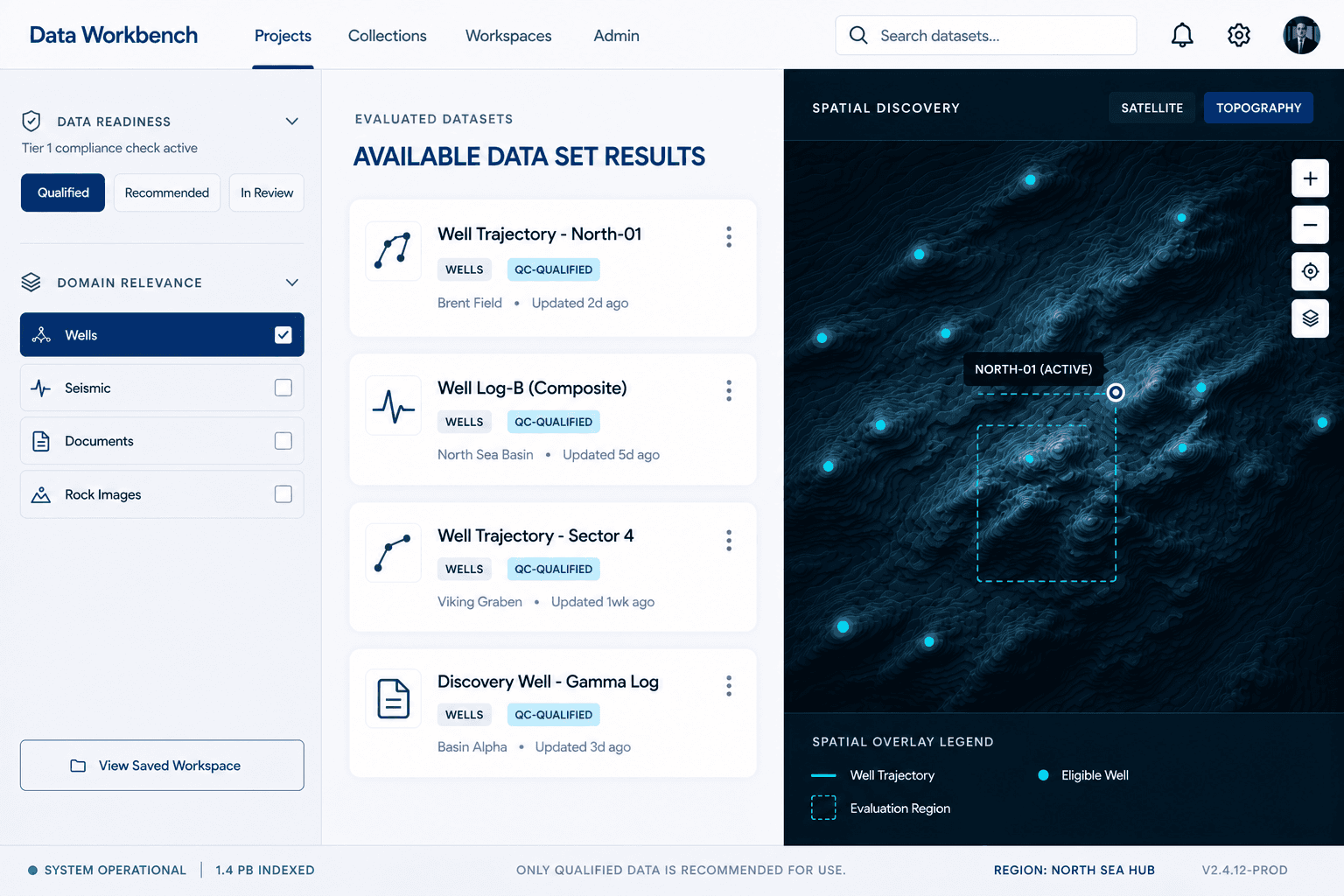
Only system-recommended, QC-qualified datasets enter the decision space.
Impact
Risk is prevented upstream instead of discovered mid-workflow.
Data Workbench — readiness-filtered data results screen
③ Use with assurance

Design for confident decisions

Problem
The last step before interpretation lacked a clear verdict on fitness.
Decision
Turn QC from raw output into a confidence gate.
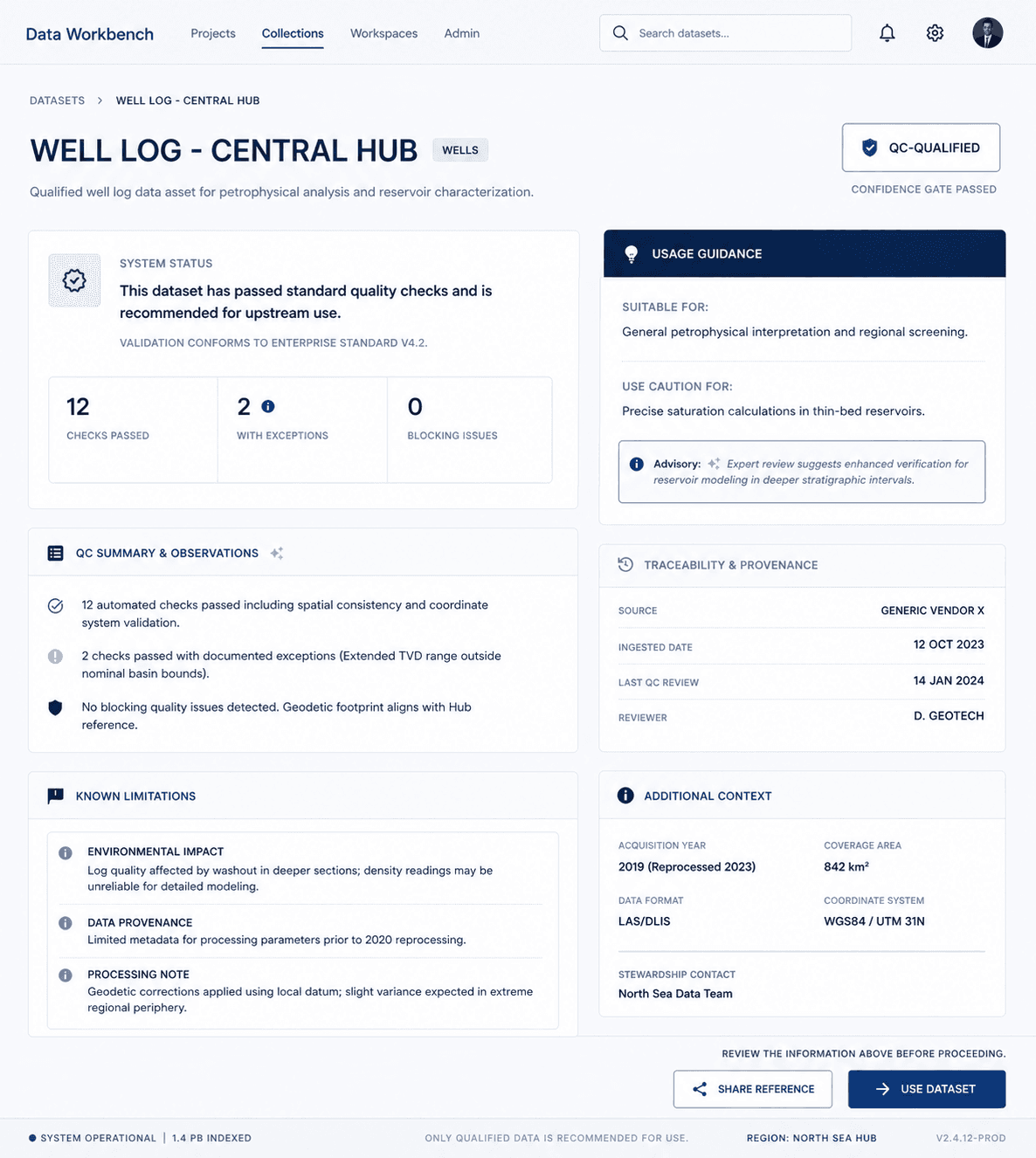
Design
Explain fitness, limitations, and intended use at the point of decision.
Impact
Trust shifts from tribal knowledge to system-supported decisions.
Data Workbench — dataset confidence-gate screen
④ Share without losing governance

Governance without friction

Problem
File exports created shadow copies that broke lineage and compliance.
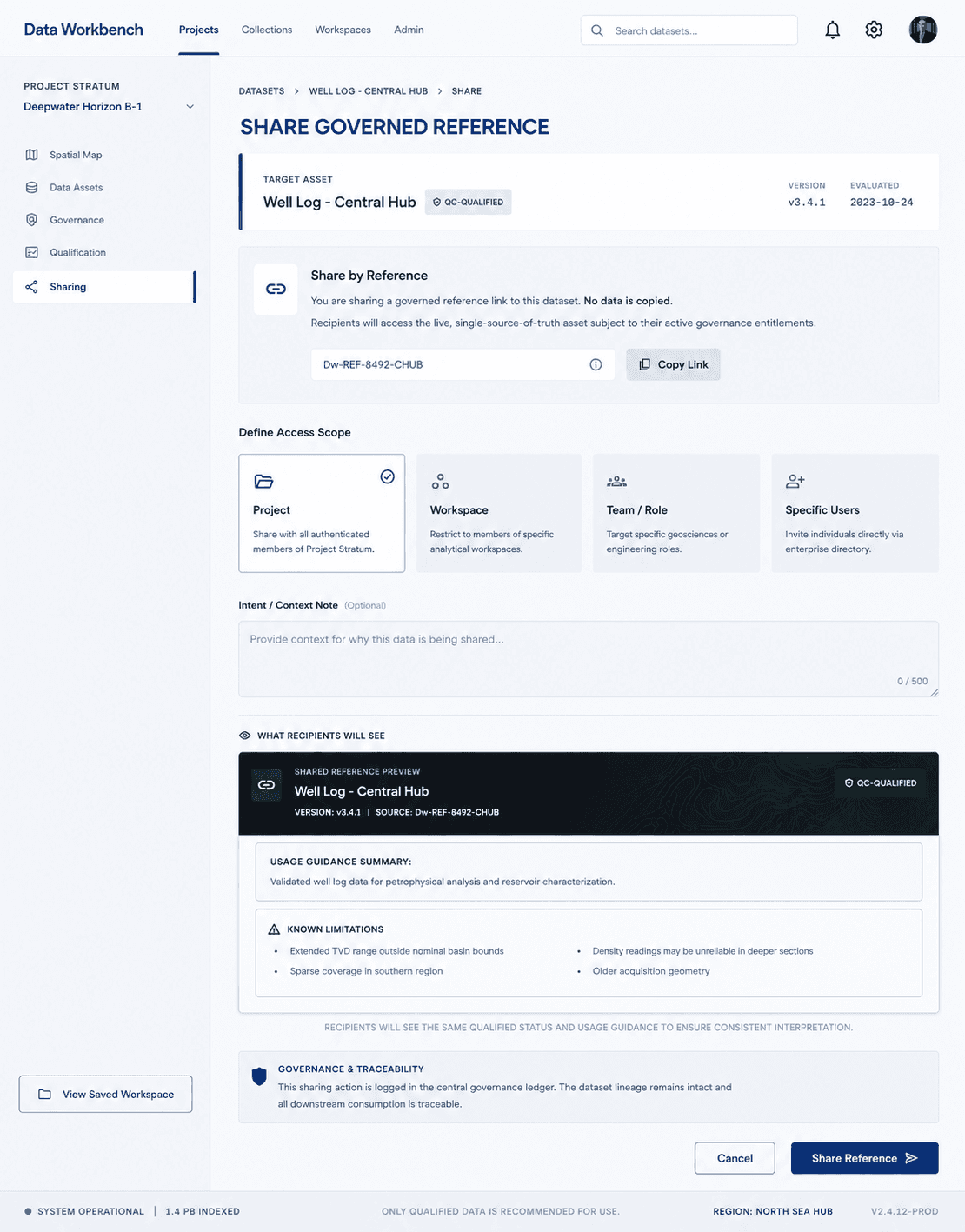
Decision
Replace exports with reference-based collaboration.
Design
“Use Dataset” and “Share Reference” on one qualified version, with scoped access.
Impact
Speed without shadow data or compliance risk.
Data Workbench — governed reference sharing screen
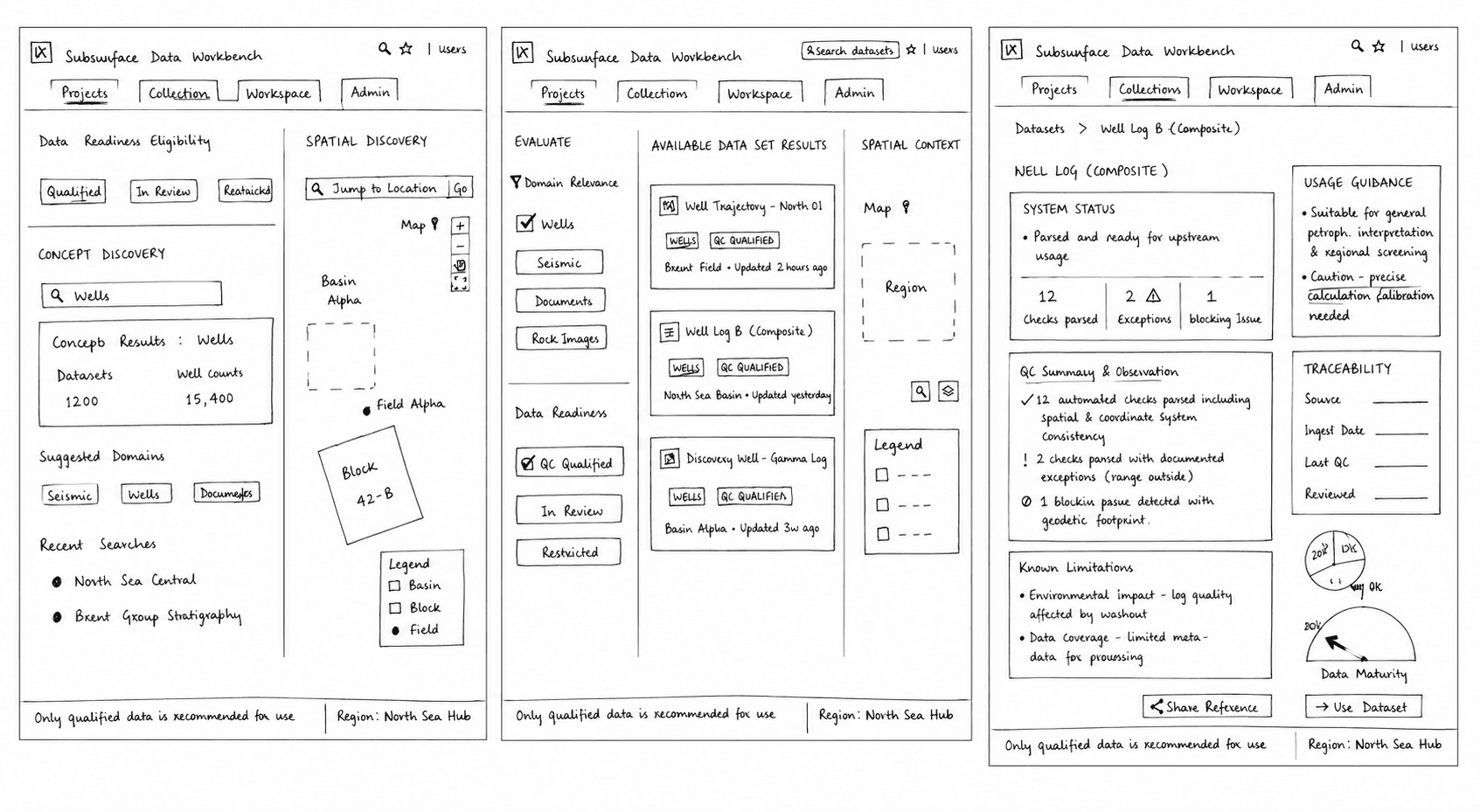
Early exploration · low-fidelity wireframes
Data Workbench — low-fidelity wireframes of the end-to-end flow

Before high-fidelity design, low-fidelity wireframes mapped the end-to-end flow across all four decision moments — testing structure and sequence before visual detail.

Scope
Supported users
Data Managers + Domain Experts
Core workflows
Discovery → Validation → Sharing
Experience focus
Trust, Governance & Data Readiness
Expected experience outcomes
  • Earlier visibility into data readiness.
  • Reduced reliance on tribal knowledge.
  • Better governed collaboration.
  • Higher confidence before interpretation begins.
Reflection

In subsurface workflows, speed without trust is risk, and governance without usability is friction. The Data Workbench delivers both.

What I'd do next. Deepen system feedback loops — instrumenting QC bottlenecks, expanding proactive guidance, and refining patterns as new data types are introduced.

All perspectives
Perspective·Enterprise UX·5 min read

Enterprise Work Is Complex. The Software Doesn't Need to Be.

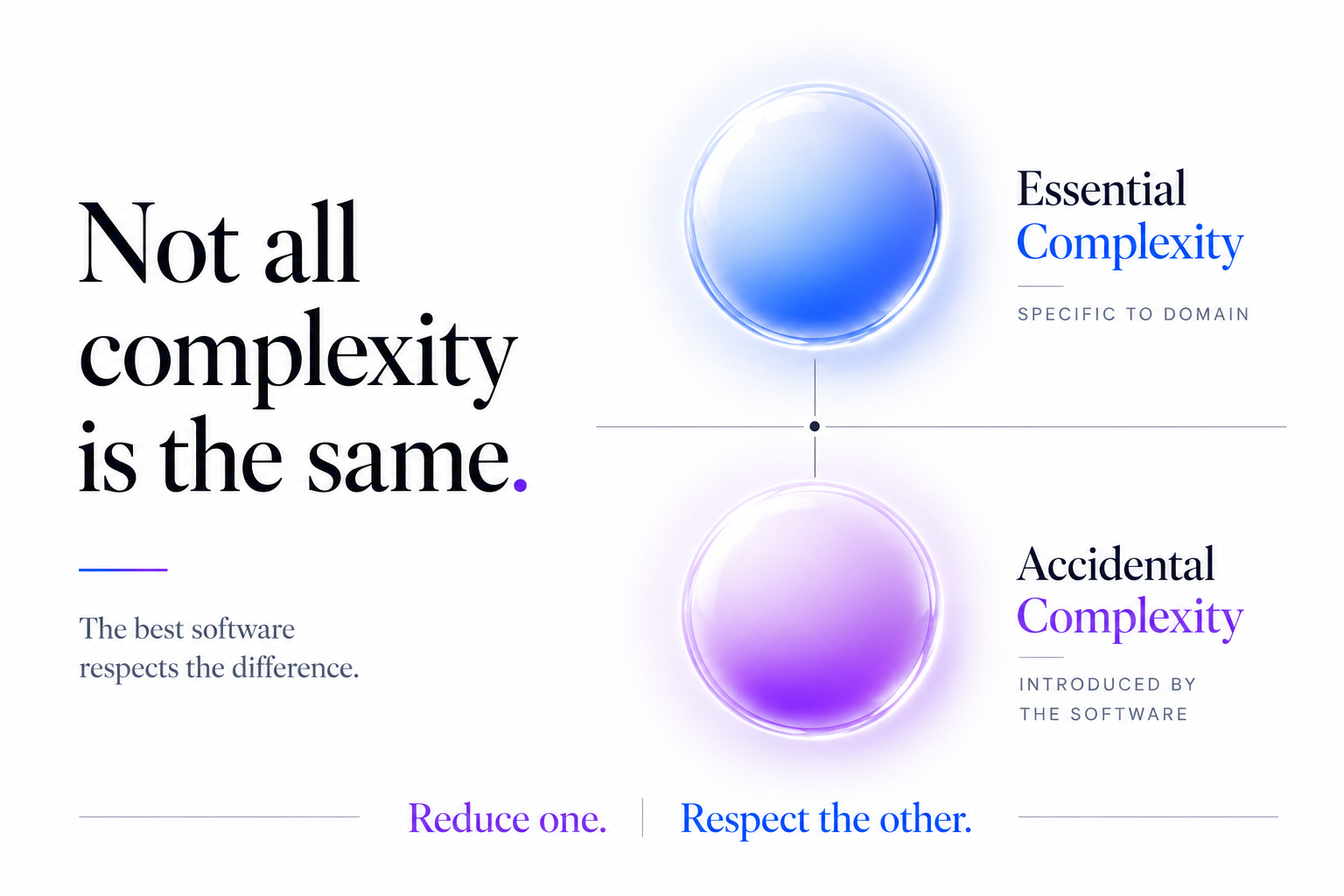
Two things get called “complex” in enterprise software — the work, and the software. Only one of them is unavoidable.

EssentialComplexity
Intrinsic to
the domain
AvoidableComplexity
Introduced by
the system
Enterprise UX removes one. It respects the other.

Enterprise work has always been complex. Enterprise software doesn't always need to be. Yet the two are often treated as if they're the same thing.

After years of designing enterprise products for highly specialised domains, I've come to believe that we often use the same word — complex — to describe two very different things. The first is the complexity of the work itself. The second is the complexity introduced by the software. Only one of these is unavoidable.

Two kinds of complexity

Software engineering has long distinguished between essential complexity (the complexity inherent to the problem) and accidental complexity (the complexity introduced by the solution). Fred Brooks described this distinction nearly four decades ago in No Silver Bullet. The same principle applies just as strongly to the interfaces we design.

Professionals working in enterprise environments solve inherently difficult problems every day. Geoscientists interpret uncertain subsurface data. Engineers evaluate technical trade-offs before making operational decisions. Analysts synthesise large volumes of information where accuracy matters far more than speed. Their work involves uncertainty, dependencies and judgement. That complexity belongs to the domain. Good software should respect it — not try to oversimplify it.

What doesn't belong to the domain is the effort spent navigating inconsistent workflows, searching for information scattered across multiple screens, remembering system-specific exceptions, or performing repetitive steps simply because the interface evolved that way over time. This is avoidable complexity.

The adaptable expert

One observation has stayed with me throughout my career: experienced users are remarkably adaptable. They learn complicated workflows. They memorise shortcuts. They create personal workarounds. They develop mental models that help them navigate systems that have grown over many years.

I remember working with a petrophysicist who had spent more than twenty years in the field. She was trying to answer what sounded like a simple question:

How do these wells compare?

To do that, she exported the data into her own spreadsheet — every single time — because the application couldn't present the values side by side. Taped beside her monitor was a handwritten list of the exact steps needed to get there. She didn't see it as a problem. It was simply how the work was done, and over the years she had taught the same routine to every new member of her team.

That workaround wasn't a sign the software was working. It was a sign of how much expertise, patience and adaptability the people using it brought with them every day.

Enterprise products rarely become difficult overnight. Complexity accumulates gradually. New capabilities are added. Customer needs evolve. Regulations change. Different teams contribute to the product over many years. Every decision makes sense in isolation. Over time, however, those well-intentioned decisions can combine into an experience that demands more effort than the work itself.

This is what makes enterprise product design such an interesting challenge. The objective isn't to make sophisticated work appear simple. It's to ensure the software doesn't become another problem experts have to solve.

Every unnecessary click, context switch or workaround consumes attention. On its own, the impact seems insignificant. Across hundreds of users, repeated thousands of times over months and years, that cognitive overhead quietly becomes slower decisions, longer onboarding, inconsistent ways of working and reduced confidence in the product.
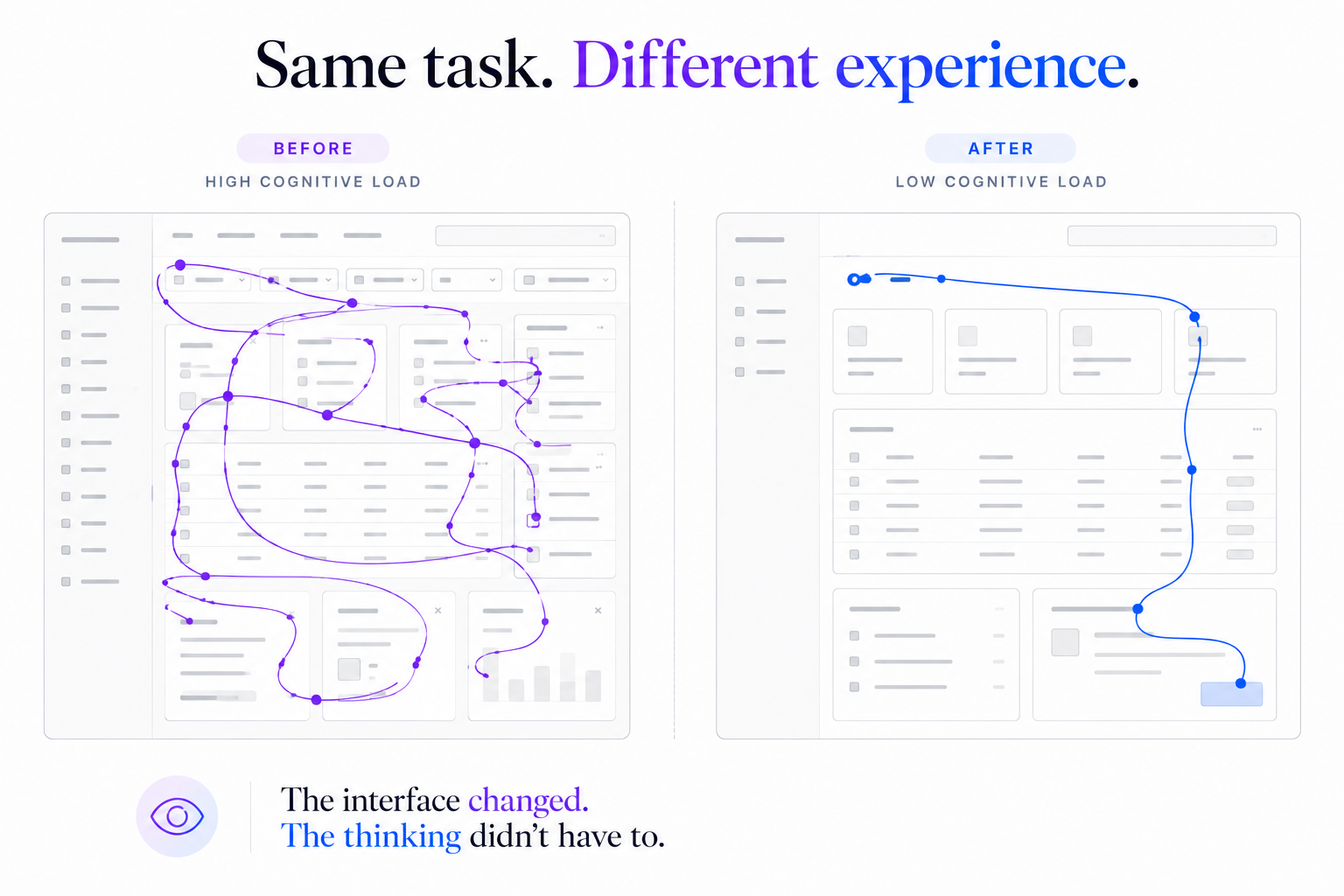
Workflow transformation — a repeating question, spreadsheet, workaround, decision loop versus a cleaner question, application, decision flow.

Good enterprise software doesn't reduce the number of decisions people make. It reduces the effort required to reach those decisions. The most valuable enterprise software doesn't make experts less expert — it allows them to spend their expertise where it creates the most value.

Fixing problems like this is rarely about designing a better screen. It means making the case — across product, engineering and domain experts — that a workaround people have quietly accepted for years deserves priority over the next new feature. That's often the real work of enterprise product design: not adding more, but deciding what deserves to be simplified.

When enterprise software removes unnecessary friction, experts can spend their expertise where it creates the most value. That's what great enterprise UX is really about. Not software that hides complexity. Software that refuses to add to it.

Enterprise work will always demand expertise.
Our software shouldn't demand expertise of its own.

All perspectives
Perspective·Enterprise UX·4 min read

Experts Aren't Hired to Search. They're Hired to Think.

Enterprise experts spend the morning finding, exporting and reconciling data — and only after lunch does their judgment come into play. On the two kinds of work in every expert's day.

Where does the expert’s time go? Question Judgment The expert The interface Interpretation finding · switching · exporting · reconciling The expert’s path is short. The interface’s is long. The distance between knowing and doing

A reservoir engineer isn't hired because they know where data lives. They're hired because they know what it means.

Give one a set of well logs and they can tell you, often in minutes, which zones are worth a second look and which aren't. That judgment is the product of years — formations studied, mistakes made, patterns learned. It's the reason they're in the room.

So it's worth asking how much of their day actually calls on it.

Consider a familiar morning. An engineer needs to compare a handful of wells — a question their expertise can answer almost at a glance. But the data doesn't sit in one place. Some of it is in the interpretation software. Some is in a spreadsheet a colleague sent last week. Some lives in a system that exports, reluctantly, to a format that needs cleaning before it can be used.

So the morning goes to finding, exporting, reconciling and lining things up — until, sometime after lunch, the comparison finally sits on one screen and the real work begins.

None of the hours before that required a reservoir engineer.

Every minute spent searching, gathering or connecting information is a minute not spent applying expertise.

Two kinds of work

Not all of an expert's day needs their expertise. Some of it does — reading the formation, weighing the risk, making the call. And some of it is simply the cost of assembling what they need before they can begin: finding the file, switching the tool, rebuilding a picture the software handed over in pieces.

The first kind is why they were hired. The second is why they're slow.

This isn't to say gathering is always waste. Sometimes moving through the data is how an expert builds context, and good products protect that. But most of the searching and reconciling in enterprise work isn't sense-making. It's overhead — work that produces little that requires the expert's expertise, quietly consuming the hours meant for the work that does.

What the best products actually do

It's tempting to solve this with more intelligence — features that suggest, predict, or decide on the expert's behalf. But the engineer in our story didn't need a smarter tool. They needed the comparison in front of them, so the expertise they already had could go to work.

The best enterprise products don't make experts smarter. They make it easier to apply the expertise they already have.

They do it by removing what stands between the expert and their own judgment — the export, the reconciliation, the fifth place the data was hiding. Not by adding knowledge, but by clearing the path to the knowledge that's already there.

An expert's judgment is the reason they were hired.

The best software makes sure it's the reason they're there all day — not just the part that starts after lunch.

All perspectives
Perspective·Enterprise UX·4 min read

The Most Strategic Thing a Designer Does Is Decide What Not to Build.

Teams are rewarded for what they ship. The more senior question is what shouldn't be shipped at all.

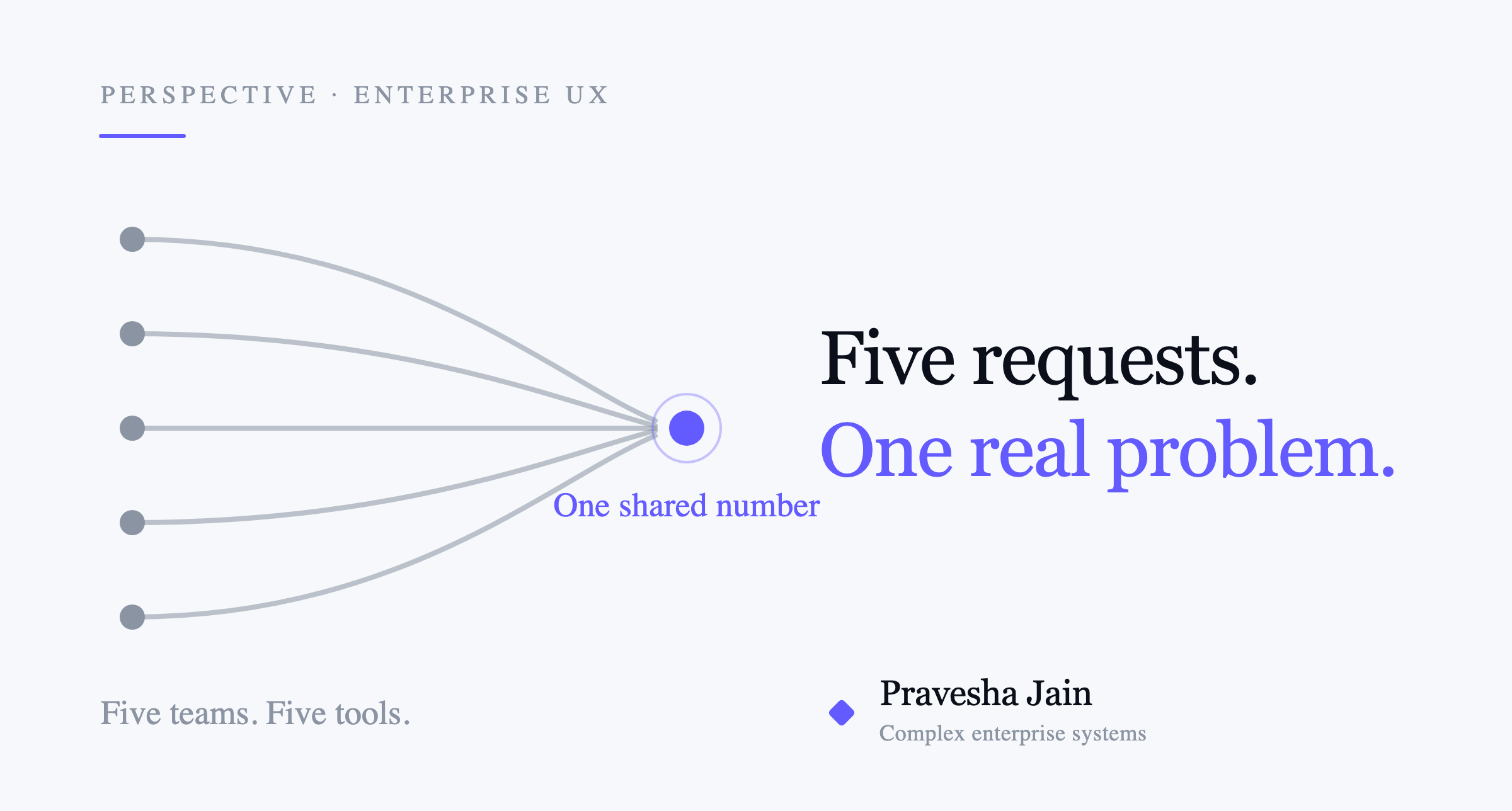
Five teams, five tools and five different numbers converging on one shared number.

Every roadmap I've worked on was longer than the year that had to hold it. There were always more good ideas than time to build them. The hard part was never generating options — it was deciding which ones deserved the team's attention, and which were quietly better left unbuilt.

We tend to measure design by what appears on the screen: the layout, the flow, the moment something finally feels obvious. That work matters.

But there's another kind of contribution that happens before anything is drawn. It's the judgment about which problem is actually worth solving. I've come to believe that's what separates a designer who ships work from a designer who shapes the business.

Five teams, five requests, one real problem

In one enterprise product I worked on, five different teams were asking for what looked, at first, like five different capabilities. Each wanted the tool to work a little more like the way they already worked. On paper, the job was clear: build a better version that satisfied all five.

But the five teams were all estimating the same project — and each did it in their own tool. Five tools, five spreadsheets, five different numbers, with a $7M spread between the lowest estimate and the highest. Early, high-consequence decisions — including what to promise a client — were being made on numbers nobody fully trusted. And the tool meant to bring those numbers together had, over time, become one more form to fill in.

A tool built to align people that no one trusts isn't a feature problem. It's a signal that the wrong problem is being solved.

So I stopped treating the five requests as requirements and started treating them as symptoms. Underneath all of them was a single, shared problem: no two teams trusted the same number. And that is not something another estimation feature can fix.

The obvious solution wasn't the valuable one

The obvious move — build the tool they'd asked for, only better — would have shipped, demoed well, and changed almost nothing. The valuable move was smaller and harder to sell: reframe the product from a place where people entered estimates into a place where they aligned on them. Estimation became alignment. Assumptions became visible. Scenarios became comparable.

The most useful thing I did on that project was help the team not build the tool they had asked for.

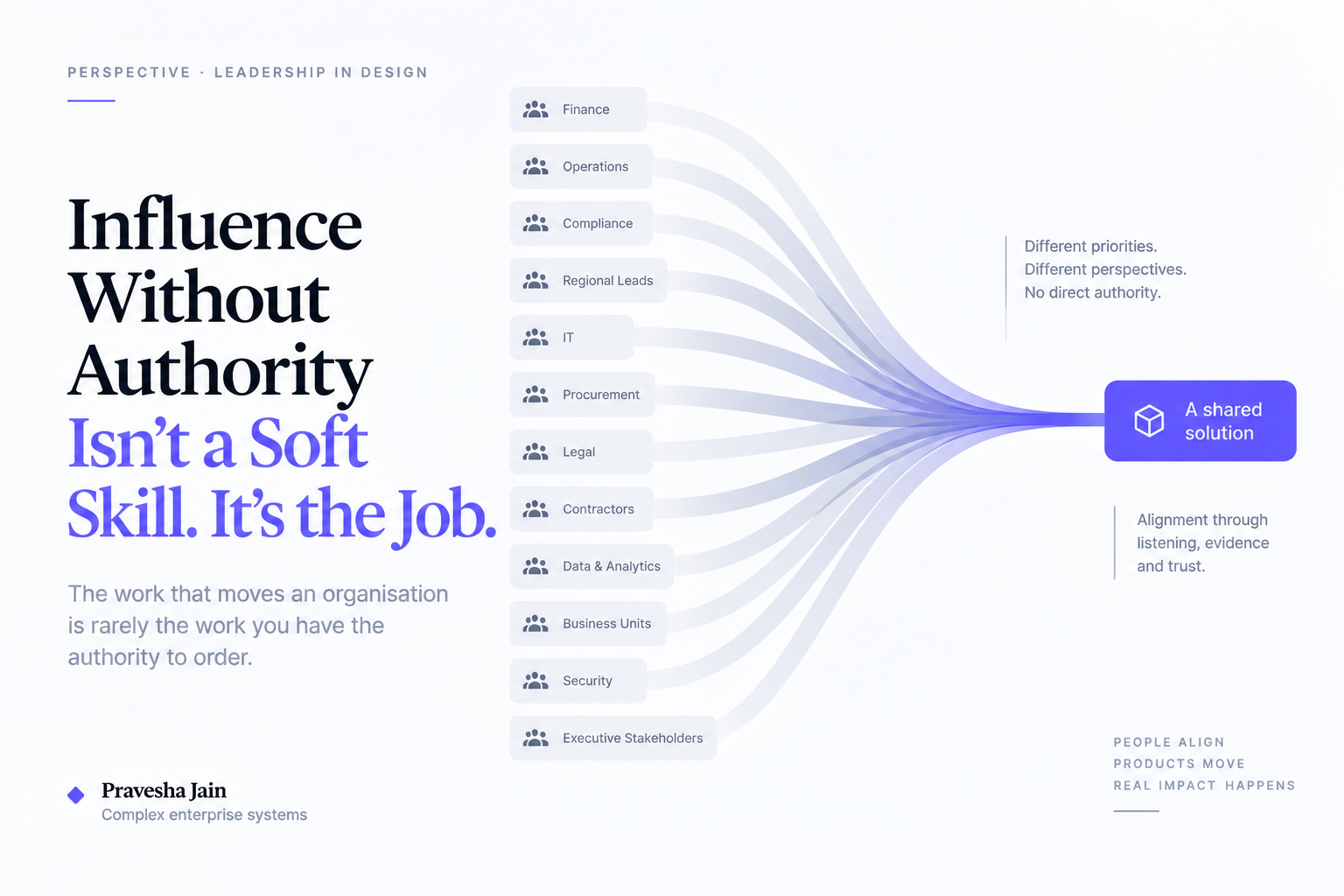
None of that is a screen decision. It's a decision made across product, engineering and domain experts — convincing a room that a problem people had quietly lived with for years deserved priority over the feature already on the roadmap. That conversation, not the interface, is where the outcome actually turned.

What the job actually is

A designer's job starts before the interface. It's to help the organisation understand which problem is worth solving in the first place. Deciding what not to build is a design act — because the cost of solving the wrong problem is far greater than the cost of getting a screen wrong.

The product happened to be an energy platform, but the question is universal: which problem actually deserves the team's next quarter?

The real deliverable

Senior design, more than anything, is about creating clarity around investment decisions — where a team's time should go, and where it shouldn't. A beautiful feature nobody needed still cost a quarter. A plain decision that resolved the right disagreement can change how an organisation works.

Anyone can turn a request into a screen.

The harder, more valuable work is knowing which request deserves to become one — and which the business is better off without.